
Chapter 1: What is Ensemble?
Ensemble is a wardrobe management system for OpenSimulator (and Second Life). It lets you organise your avatar’s RLV outfit folders on a web page and wear or remove them with a single click — whether you’re sitting at a keyboard, using a mobile browser, or handing control to someone else.
This chapter explains what Ensemble is, how its two parts fit together, and what you will need before you start.

The Ensemble Hud
1.1 The Two Parts of Ensemble
Ensemble has two components that work together:
- The HUD — a small object you wear on your avatar. It runs inside your viewer and handles all communication with the web panel and with RLV. From the outside it looks and behaves like a single object, though it contains two internal scripts (Core and WebRelay) that manage different concerns.
- The web panel — a PHP application running on a web server. It stores your outfit library in a database and provides the browser interface through which you manage and trigger outfits. You can use the shared hosted instance at https://ensemble.virtualportal.space or run your own copy on your own server.
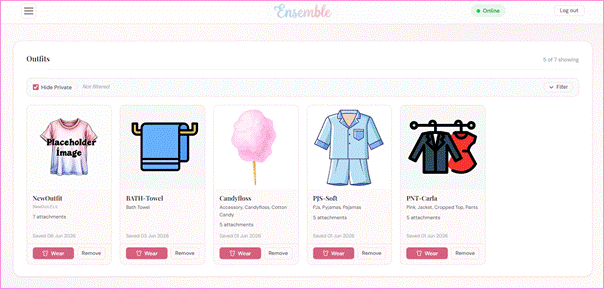
The Ensemble web panel showing the outfit dashboard with several outfit cards]
You do not need to know anything about the internal scripts to use Ensemble. The HUD is simply one object you wear; the web panel is a website you log in to. Everything else happens automatically.
1.2 How They Work Together
When you wear the HUD, it connects to the web panel over HTTP and registers your avatar. The web panel assigns you an account and sends back a temporary password via instant message so you can log in.
Once you are logged in, the flow for wearing an outfit works like this:
- You click Wear on an outfit card in the web panel.
- The web panel sends an instruction to the HUD.
- The HUD translates this into an RLV command and delivers it to your viewer.
- Your viewer’s RLV layer attaches the items from the named folder in your inventory.
- The HUD reports back to the web panel, which updates the outfit card to show the new status.
The whole process takes only a few seconds. Removing an outfit follows the same path in reverse.
1.3 What is RLV?
RLV stands for Restrained Love Viewer (or Restrained Life, depending on the viewer). It is a standard feature built into Firestorm and several other OpenSimulator-compatible viewers that allows an in-world object — such as the Ensemble HUD — to send commands that attach or detach items from your avatar’s inventory.
Ensemble uses RLV only to wear and remove outfits. It does not use any of RLV’s restriction or control features. If you have never used RLV before, all you need to know is:
- RLV must be switched on in your viewer before the HUD can wear outfits.
- Your inventory must contain a folder called #RLV. Outfit folders must be inside this folder for RLV to find them.
- Nothing else about RLV is required. You do not need to understand how RLV works in detail.
Chapter 2 walks you through enabling RLV and setting up the #RLV folder step by step.
1.4 What You Will Need
Before you can use Ensemble you will need the following:
- A grid account — an account on an OpenSimulator grid, or a Second Life account. Ensemble works on any grid that supports RLV.
- An RLV-capable viewer — Firestorm is recommended and is what this manual uses for screenshots. Other viewers that support the RLV standard should also work.
- A copy of the Ensemble HUD — available from the OpenSimWorld Script Library (see Section 1.5 below).
- Access to a web panel — either the hosted instance at ensemble.virtualportal.space (no setup required) or your own self-hosted installation (see Part 3 of this manual).
You do not need a web server, a database, or any technical knowledge to use the hosted instance. If you prefer to run your own copy, Part 3 covers installation on both nginx and Apache.
1.5 Open Source and Where to Get It
Ensemble is fully open source and is distributed with full permissions. You are free to use it, modify it, and share it. The complete source code — LSL scripts, PHP application, and CSS themes — is available from:
- OpenSimWorld Script Library — search for Ensemble; the listing includes the HUD object, the PHP web panel files, and this documentation.
The hosted web panel at ensemble.virtualportal.space is provided as a convenience for users who do not want to self-host. It is a shared instance; your outfit data is stored securely and is not visible to other users.
For questions, bug reports, or to share a theme you have created, the OpenSimWorld Script Library page is the best starting point. Community contributions are welcome.
1.6 A Note on Terminology
Throughout this manual the following terms are used consistently:
- HUD — the in-world object you wear on your avatar.
- Web panel — the browser-based interface at the Ensemble website.
- Outfit — a named entry in your Ensemble wardrobe, corresponding to a folder inside #RLV in your inventory.
- Wear / Remove — the actions of attaching or detaching an outfit’s items via RLV.
- #RLV — the top-level inventory folder required by RLV; outfit folders must be inside it.
With that background in place, Chapter 2 takes you through setting up Ensemble for the first time.